QueVault

A private home for the details that matter

Your digital life.
Beautifully secured.

QueVault brings passwords, software licences, memberships, important documents, prescriptions and private notes together in one calm, encrypted vault.

One app for Mac, iPhone and iPad.

Local or iCloud vaults Verified backups No advertising or tracking
Passwords Licences Documents
Private by designYour vault remains under your control.
Made for AppleA familiar experience on every device.
Built to recoverGuided, verified backup protection.

The whole picture, in one vault

Stop searching. Start knowing.

The important details of everyday life are usually scattered across emails, browsers, folders and old receipts. QueVault gives each one a proper home.

01 — Collect

Everything important, together.

Keep logins, licences, banking details, memberships, passports, prescriptions, vehicles, files and private notes in a searchable library.

  • Purpose-built record types
  • Files, icons, tags and dates
  • Custom templates for anything else
02 — Find

The right detail, right away.

Browse by record type, category, tag or favourite, then search across the information that matters. Helpful icons make a large vault feel instantly familiar.

  • Fast search and sorting
  • List and visual grid layouts
  • Favourites and recoverable Trash
  • Copy values with a single action
03 — Protect

Security without the drama.

Choose local storage or supported iCloud vaults, secure access with Apple biometrics, and add independent verified backups.

  • Encrypted vault formats
  • Face ID and Touch ID support
  • Automatic locking and backup health

Bring your records with you

Move in without starting over.

Import from popular password managers and browsers, review everything before it enters your vault, and decide exactly what happens when QueVault finds a possible duplicate.

1PasswordmSecureBitwardenProton PassDashlaneKeeperLastPassApple PasswordsChromeFirefoxEdge
Import reviewReady
1P
Example AccountLogin · Icon found
New
⇄
Software LicencePossible match found
Review
✓
MembershipReady to import
New

You remain in control before anything is saved.

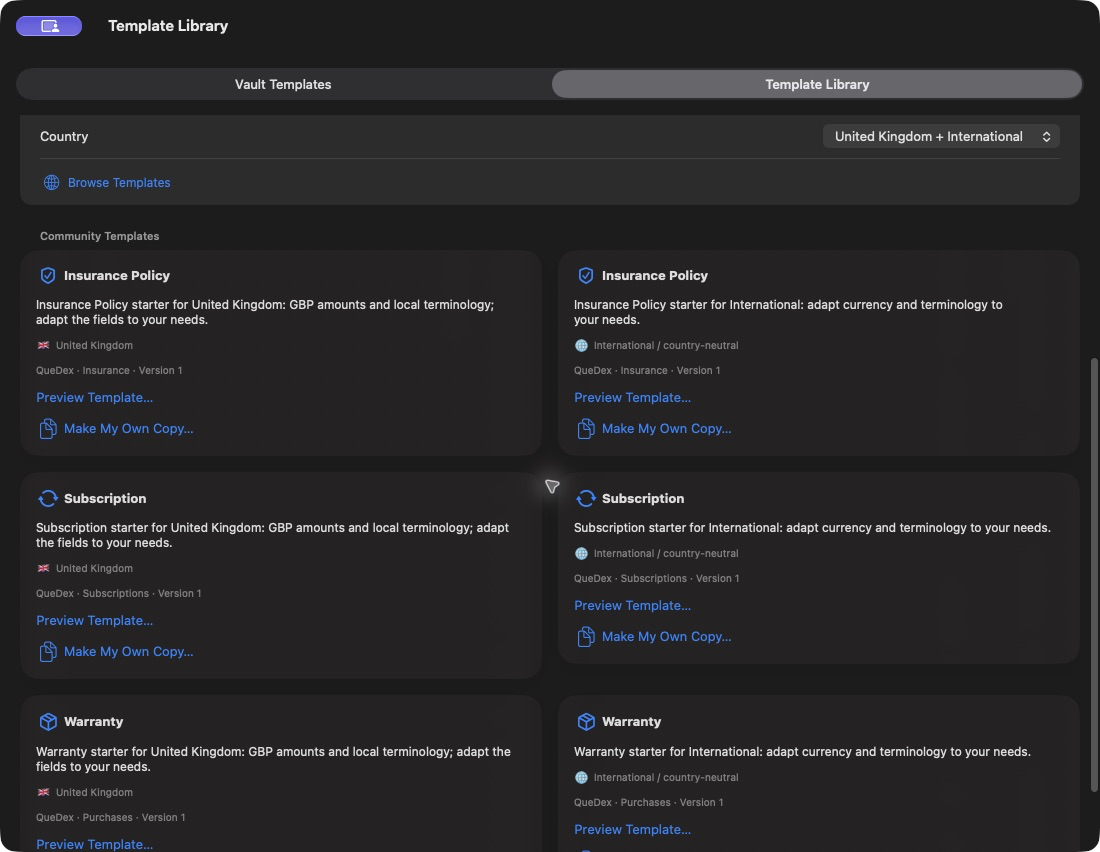
Real QueVault Community Template Library with country-labelled designs
Browse public designs, preview the fields, and keep an independent copy. View full size

Designed around your information

Your vault should fit you—not the other way round.

Start with QueVault’s built-in record types or create your own reusable template with precisely the fields and sections you need.

  • Copy and customise protected built-in templates
  • Add text, passwords, dates, choices, files and secure fields
  • Create repeating rows for licences, service history or checklists
  • Choose an icon and colour so every collection is recognisable
See everything QueVault can organise

Templates that travel with you

Start with a useful design. Make it yours.

Build your own record types or discover reviewed designs in the Community Template Library.

Ready for everyday life

Start with insurance policies, warranties and subscriptions. Country labels help you choose local terminology and currencies. The library defaults to your country plus International, with other countries and All countries always available.

Your library, across vaults

Keep reusable designs in My Templates, then install a separate copy in each vault. The vault keeps the templates its records use. Make My Own Copy creates an independent design you can adapt and label for another country.

Share a form, keep your values

Template files (.qvt) share sections, field definitions and layout, without saved records or attachments. Preview imports before adding them. Review labels, hints and choices for private details before submitting a design for community moderation.

Need your saved information too? Use a vault backup or record export. A template download contains the design of a form, not the contents of your vault. Custom template use is subject to your edition’s allowances.

Keep useful information

The wrong record type is easy to correct

Edit one record, choose a different template, and review suggested field matches. Drag fields or choose sources from menus, then preview before saving. Unmapped values remain in Additional Fields.

Small actions, less effort

  • Copy concealed values without revealing them
  • Clear a search with one click
  • Choose whether to keep numbering in pasted recovery codes
  • Keep tags, files and purchase history when converting
Read the updated support guide

Start simply. Grow when you need to.

Three straightforward editions.

Try QueVault free, unlock a complete personal vault, or add the organisation features needed by a small business.

Free to try

Trial

Explore the QueVault experience.

  • Up to 5 records
  • 1 local vault
  • App-password protection
Coming soon
£25 per year

Small Business

More vaults and operational detail.

  • Up to 50,000 records across your vaults
  • Up to 5 vaults
  • Business management fields
  • Medium encryption included
  • Existing data remains accessible after expiry
Choose Business
✦
Maximum Encryption

Add QueVault’s strongest password-hardening preset to Personal or Small Business with a separate one-off purchase.

Learn more

Why QueVault?

Private software should put you first.

Your data is yours

QueVault does not require you to hand your private records to a developer-controlled server.

No hostage data

If Small Business expires, existing records remain available to view, copy, export and back up.

Useful recovery

Backups are verified before entering history, and unchanged copies do not waste your restore points.

Good to know

Questions, answered.

Which devices will QueVault support?

QueVault is being prepared as one App Store download for Mac, iPhone and iPad.

Where is my vault stored?

You choose. Keep a vault locally or use supported iCloud storage. QueVault does not require a developer-hosted account for your vault data.

Can I import my existing passwords and records?

Yes. QueVault supports imports from leading password managers and browsers, with a review step and duplicate handling before records are saved.

What happens if a Small Business subscription ends?

Existing vaults remain unlockable and their records can still be viewed, copied, exported and backed up. New business activity pauses until renewal; your existing data is not deleted or hidden.

Is Maximum Encryption a separate subscription?

No. It is planned as a separate one-off add-on for either paid edition.

QueVault 0.9.5

Ready when your records are.

QueVault is completing its final App Store preparation. The download button will link directly to Apple as soon as the listing is available.